Nurturing The Knack
Posted: November 5, 2012 Filed under: Avaya Blog Post Leave a commentIn my previous blog post, I talked about how increasingly valuable having The Knack is in technology support organizations. This troubleshooting ability is becoming increasingly necessary as IT environments evolve into more complex and integrated systems. Mike Runda, Avaya Senior Vice President and President of Avaya Client Services, touched on this in a recent white paper on challenging the status quo:
“As technologies become more complex, problems are more likely to be system-wide rather than in a single component. They can emerge from the network, an application, an end user or a configuration file–and from any vendor’s product.”
As Mike says above, technology ecosystems are complex and require a troubleshooting skill-set to match. Those already operating with The Knack are in a good place to seek out the root causes in such environments.
So how do we foster an environment that encourages feeds, and rewards this mentality?
Interview for The Knack
When I interview candidates for a technical support related position, I am more interested in how well they troubleshoot a general problem versus how much they know about any one specific technology. One of my go-to interview questions is a role-playing scenario where they are a wireless router support engineer and I call them, as a customer, because I can’t get my laptop to connect to ESPN for the latest scores. As the candidate role-plays with me, I’m paying attention to how they approach the problem. I expect them to get clarity on my problem, not assuming anything. Next is the (perhaps stereotypical) question: “Do you have a wireless router and is it turned on?” What I’m really looking for is if they have a systematic approach to narrowing down the root cause? Or do they simply guess at the solution based on common problems?
Some hiring managers use less technical and more analytic questions like: Estimate the number of dry cleaners needed in Pittsburgh. Questions like this don’t have a right or wrong answer, but look to evaluate how the applicant applies logic to a problem. (For example, I’ll assume there are 2 million people in Pittsburgh. Half are over the age of 18. Given the focus on manufacturing, I’ll assume only 10% regularly wear clothes that need dry cleaning. If we assume each store can handle 500 customers, then 200 stores in Pittsburgh.)
The way I look at it, it is much easier to teach someone a specific technology or product if they already know how to troubleshoot. The Knack, on the other hand, is quite difficult, if not impossible, to train someone on. Given the economic climate, most of you are probably not staffing up teams by hiring off the street, so encouraging better troubleshooting in your existing engineers is more realistic.
Nurture and Encourage The Knack
At Avaya, we have found that having a diagnostic framework in place helps focus and remind our engineers to not get ahead of themselves when looking at a customer issue. While those with The Knack, may have this embedded in their DNA, the framework does act as a reminder for them and a guide for others. The Avaya Diagnostic Methodology looks like this:
- Problem Clarification: Move from the stated problem to a focused, specific clarification of the exact problem.
- Problem Analysis: Move from knowing the problem to knowing the cause
- Problem Resolution: Move from the cause to a confirmed resolution of the problem.
- Knowledge Management: Search the knowledge-base for an existing article on this issue. Modify the knowledge database based on your findings.
At times, we’ve also sponsored internal competitive events based on real and hypothetical technical problems to see how well teams of engineers can work together to solve complex issues. The conclusion of such an event should not only celebrate the winning team, but also having them publicly share their approach with the larger group so that everyone learns.
Automate Everything You Can
To help your engineers focus on the art of troubleshooting, remove as much repetitive work from the process as you can. As Mike Runda said in the white paper mentioned above, at Avaya “our support vision is to have humans work on only new problems; let automation and advanced systems resolve existing problems when they occur.” To that end, the organization that I lead partners with others in the business to identify areas that can be automated and then use tools to remove that burden from our employees. Some examples are:
- EXPERT Systems: Our automated system that responds to product alarms and programmatically resolves the majority of them without any human interaction
- HealthCheck: A collection of product-specific tools that look at the product’s configuration, comparing it to best practices, and quickly highlighting potential problems
- OIS Advanced: New technology that provides Avaya (and our clients) real-time and historical performance of the client’s network, allowing us to correlate solution problems with network problems and disturbances to isolate the network as the cause of the solution problem.
I encourage you to look around your company’s IT and support teams and see if you can identify those with The Knack. When you do, think about ways in which you can better utilize their skills and perhaps select them to be mentors. These talented engineers may be what make the difference in your organization’s ability to adapt to the growing complexity.
How does your organization filter for and encourage The Knack in your organization?
The Kneed for The Knack
Posted: October 17, 2012 Filed under: Avaya Blog Post 1 CommentThe following was originally posted on the Avaya site here.
In a product support organization, your people are, without a doubt, your most critical resources. While you can use knowledge bases and tools to prevent re-discovery, new problems will always arise and you need engineers who can quickly get to a resolution. The skill I value the most in engineers is their ability to troubleshoot. By that I do not mean their ability to recall from memory what an Error 529 is on a specific product (that’s what knowledge bases are for); rather I’m referring to their ability to look at a technical problem, narrow down possible root causes, and logically find the solution. At first glance this may be confused with basic critical thinking, but it is something beyond critical thinking; it’s The Knack.
There is no better way for me to convey the concept of The Knack then to play the following embedded Dilbert cartoon. If you’re short on time, just watch the first two minutes. (The rest of this episode can be found here and here.)
Like most humor, the writers of that comic took a truth and moved it to an extreme for a laugh. I’ve yet to meet an engineer that could sense a battery going bad in a TV remote, but I have met many that can stare at a problem and solve it without any direct experience. For many people, changing the time on a car radio can be irritatingly complex without the manual for reference. An engineer with The Knack, howeverunderstands the design limitations of the user interface of the clock, has used one before, and can surmise the proper steps in almost any car.
Several years ago, I was involved with a critical outage of a web-based application experiencing a timeout issue. An engineer was brought into the escalation that had no experience with this solution at all. He asked a series of questions to get a mental image of the architecture similar to the one below:

He reasoned (correctly so), that if we submitted a unique series of letters at the website, searched the logs on each server for that phrase, and noted the timestamps of the relevant log messages, we could determine which component was adding the delay and tripping the timeout. Once identified, we could get the relevant expert on the phone and get the system back up within minutes. This engineer didn’t get caught up in the reality that he didn’t know how this solution was written nor the underlying technologies well enough to troubleshoot any of them in great detail. Instead, just like with the clock, he combined solid critical thinking with a working knowledge of web architecture to quickly narrow down the possibilities.
While this diagnostic skill has always been respected, it is getting more and more valuable as technology evolves and become more intricate. While new solutions bring improved value to users, the underlying technology that makes those products work is becoming more complex to troubleshoot.
Ten years ago, enterprise phone systems were analog and digital. The phones had their own wiring that connected them directly to the PBX, creating a contained environment where all diagnostic information was in one place. With modern SIP solutions, the phones have evolved to be multi-functional, offering complex features including presence and video. To make this possible, the infrastructure has become distributed, making the diagnostic work distributed as well. To trace a single SIP call requires diagnostic information from several servers and endpoints. The Knack – this art of troubleshooting – is needed now more than ever.
At Avaya, I’ve had the great pleasure of working with not only individuals, but entire teams of engineers blessed with The Knack. Watching one of them attack a problem is like seeing an artist paint. They use the same paintbrushes and paints as others, but the way they wield them makes them true artists. Having one of these engineers working a support issue can mean the difference between resolution times measured in hours versus weeks. While we have amazing automated tools and knowledge bases (ex. Avaya Mentor), it is these talented engineers who bring the most value to an Avaya maintenance contract.
In my next post, I’ll write about how to identify engineers with The Knack as well as how to nurture this skill within your organization. Until then, remember that with great power comes great responsibility, and in this case, often social ineptitude.
Why Virtual Office Might Be Right for You
Posted: October 17, 2012 Filed under: Avaya Blog Post Leave a commentThe following was originally posted on the Avaya site here and then again at the CIO Collaboration site here.
After having breakfast with my three children on Friday, we were sitting in our front room and happened to see one of the neighborhood fathers get in his car and drive off. My three-year-old twin boys paused, contemplated the sight, and then asked me “Why did he have to drive somewhere to go to work?” Great question.
Nearly four years ago, the small Avaya office that I was a part of closed, sending the two dozen of us regular office attendees to our homes. While I do miss the morning coffee time, putting golf balls down the cubicle row while on calls, and the occasional group lunch, I have come to appreciate and enjoy my new work environment.
Work/life balance. Working from a virtual office (VO), combined with a relatively flexible work schedule often gives the employee a healthy work/life balance. Yes, I know that sounds cliché, but I get to wake up with my children, feed them breakfast, get them ready for school, and sometimes do pick-up or drop-off. Then up a flight of stairs and I’m at work. If my kids need something (and their mother isn’t available for some reason), they know they can knock at my office door and if I’m not on the phone, they can come in for a short interlude of family time. It is also much easier to skip out of work for the kids’ swim lessons on a Friday afternoon when I’m already home (and don’t be surprised if you see a tweet from me from the pool, thanks to my LifeProof case). In return, my employer gets me for 10+ hours a day. And not only am I putting in the hours, but I’m also wicked productive (more on that later).
Why are you still in a cube? So, why aren’t more people working from home? As Dave Michels wrote in a recent CIO Collaboration post, many employees and employers don’t even pause to think if virtual office might be right for their situation. I agree with Dave that many people are missing out on a great opportunity. Avaya has done quite well with VO employees and perhaps this is not just because they have an open mind about these things, but because Avaya sells many of the communications solutions that make VO successful, which brings us back to the productivity question.
Engagement. There was an excellent blog by Scott Edinger in theHarvard Business Review last month about how remote workers are as engaged if not more than those who work in the office. You should give it a read as I won’t reiterate his excellent points here, but suffice it to say that when the supervisor and employee are not in close proximity, they consciously work at their communication, resulting in more engagement. I have found regularly scheduled 1:1 meetings are crucial. I meet with all of my direct reports for at least 30 minutes every week. For the rest of my organization, I meet individually with them every other month. Sometimes we talk about work, other times about family or sports. What you talk about matters less than the fact that you are talking. Don’t make this your only opportunity to talk every week, but having time set aside makes sure you really connect.
Communication Tools. As Scott wrote in his HBR post, having the right tools are crucial to making that communication happen regularly. While you can get by with a solid audio connection, video is becoming a huge benefit for VO employees. I’m lucky in that Avaya has a variety of tools to make working remotely successful. Here is a list of what I use (in addition to my standard desktop software):
- Avaya Desktop Video Device (ADVD) with the Flare Experience for audio and video calls
- Plantronics CS351N headset with enough range to get to the kitchen for lunch
- Use of a Scopia Video Conferencing server for video conferencing calls. This is relatively new, but is already becoming my favorite tool. More and more of my meetings are becoming video calls. My ADVD integrates flawlessly, allowing me to connect to those calls without using my laptop.
- Use of an Avaya Aura Conferencing server for audio conference calls, which also allows me to see who is on a conference call and who is speaking
- SFDC’s Chatter (internal social media tool that is becoming increasingly valuable to me)
Face Time. Another helpful tip that I’ll share is that whenever you stumble upon a colleague’s picture (LinkedIn, Twitter, internal sites, etc.), attach it to an Outlook Contact (see here). This way, whenever you receive an email from them, you will see their picture, making it feel more like a personal interaction. As an added bonus, when using an Avaya Flare client, those pictures transfer over, so you can see their pictures for phone calls as well.
Not for everyone. Don’t assume that a very productive employee in an office will remain so at home. VO is a great fit for experienced information workers that spend a good deal of time on the phone with others, especially if those others are geographically dispersed. If an employee is new to the role and/or need access to physical equipment or people, this won’t work. A certain discipline is needed in order to stay focused on work when there are increased distractions (family, television, video games, etc.) The individuals’ personality and work-type must match up to ensure the employee can continue to meet or exceed his/her objectives
The Office in Home Office. Yes, I know, you have a laptop, a smartphone, and a Bluetooth headset. That does not make you a one-woman-home-office. A coffee shop or your kitchen table while the kids play in the next room over will not be successful long term. Get yourself a quiet room with a door (ex. guest bedroom). The room doesn’t have to be office-only 24×7, but during work hours, nothing else should be taking place there. Besides, you don’t want to be the person on the conference call with the dog barking, or worse, “Daddy! I’m all done pooping and peeing!!” (Did I mention my Plantronics headset has a very handy mute button on it?)
Don’t forget your agents. While I have focused on my own experience as a knowledge worker using Unified Communications products, working from home is also a great option for Contact Center agents. I work with a customer of ours in retail and I know they value their home agents. Kay Phelps, one of my fellow bloggers here, has written a number of articles about these Home Agents, so please go give her a read.
In summary, if I were writing an online review of a product, I’d sum up Virtual Office as:
Amazing, but not for everyonePros:
- Great work/life balance
- No commute transportation costs (gas, tolls, car, auto insurance/repairs, etc.)
- Significantly reduced wardrobe expenses
- No downtime needed between meetings
- Positive environmental impact
Cons:
- No after-work camaraderie over drinks
- More self-reliance for IT and office supply needs
- Discipline needed by the employee and those they live with
I know I’m not the only VO employee out there. So, let me know what you think. Living the dream? Did you try VO and it was a fail whale? Desperate to break out of your cube and into your sweatpants? Drop a note in the comments below.
What Does Serviceability Mean to You?
Posted: October 17, 2012 Filed under: Avaya Blog Post Leave a commentThe following was originally posted on the Avaya site here.
Some days, I wonder if Serviceability is even a word as people I speak to often don’t know its meaning. Wikipedia, one of my favorite sources, defines
Serviceability as “refers to the ability of technical support personnel to install, configure, and monitor computer products, identify exceptions or faults, debug or isolate faults to root cause analysis, and provide hardware or software maintenance in pursuit of solving a problem and restoring the product into service. Incorporating serviceability facilitating features typically results in more efficient product maintenance and reduces operational costs and maintains business continuity.”
I care about the meaning of Serviceability and if people know its meaning because I’m a serviceability advocate. One of my responsibilities at Avaya is to lead Serviceability Engineering for the company, putting this term clearly in my wheel house. In general, I agree with Wikipedia, with the addition that Serviceability refers to not just maintenance support, but also the installation and configuration of the product. When asked what I mean by Serviceability, I use the following examples:
• Standardized and centralized logging
• Enhanced filtering and automatic pattern recognition
• Consistent use of SNMP alarming
• Secure Remote Access and Authentication
• Human Methodologies to approaching root cause
• Solution-wide call tracing
• Intuitive interface, with minimal set of data-gathering questions
• Automated tooling to evaluate the health of the solution
• Automated receipt and resolution of known issues
• Debugging tools and automation for particular product needs (ex. A tool to validate date in an embedded database, preventing the troubleshooter from needing DBA skills.)
I thought it would be an interesting conversation if we all took a moment to think about what Serviceability means to us. If you are a manufacturer, what do you focus on in your own products to deliver excellence in this area? If you are a Services employee (implementation and/or support), what sorts of things are you used to utilizing in the products you work on? What do you wish were present to help you do your job better? And perhaps most important, what about those of you that use communications products (all of us)? What do you expect around serviceability?
One of my favorite Serviceability features that Avaya offers is for our one-X Communicator softphone. From within the client’s user interface, the user can click a button that will generate a new email with all the logs (compressed) attached to the email. The user then answers some pre-populated questions and sends it to their IT support team. For those of you who have attempted to troubleshoot issues on a user’s desktop, you know how hard it can be to arrange for remote access and permissions to grab the necessary logs. This feature simplifies this for everyone involved (see YouTube video below for more on that)
Valued readers – Let’s make use of the comments functionality on this website. Please voice your opinions and let me know what Serviceability means to you. What are the Serviceability features that you absolutely love? What are the gaps that drive you crazy and you wish someone would address? Let me know, and I’ll correlate and comment on them in a future post.
Review of Timbuk2’s Command Messenger laptop bag
Posted: September 9, 2012 Filed under: Uncategorized Leave a comment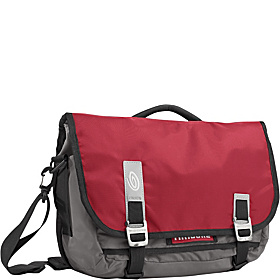
Five Stars
Great looking/performing for work/travel
Pros : Roomy , Tsa-compliant, Attractive, High Quality, Sylish, Lightweight , Comfortable , Durable
Cons : Buckles Hard To Latch
Best Uses : School, Extended trips , Office, Airplane travel , Commuting, Day Trips
Describe Yourself : Modern, Practical, Career
Was this a gift? : No
I’m a young leader at a large technology company. I moved from a bulky/heavy PC with a matching laptop bag to a 13″ MBP and wanted a bag to match. Honestly, I obsessed over what bag to get, spending countless hours looking at reviews, looking at bags in stores, etc. For some reason, I had to get this decision just right. And I did.
I’ve used this bag now for several airline trips for both personal (family of 5) and work. The bag has performed great. I feel my MBP is safe and I absolutely LOVE the TSA-compliant compartment. Feels great to unzip it, leave the MBP in the bag, and just run it through the xray. Takes risk/stress/time out of air travel.
I have had no trouble getting all my ‘stuff’ in the bag and I think the organizational aspects are just fine. I don’t have a tablet, so I haven’t used that compartment at al. The bag and the straps feel very sturdy and of high quality. The Napoleon compartment is great for keys or an ID badge, granting really easy access.
My only complaint I suppose are the clips for the main flap. They can be really difficult to clip on. I know you can use the velcro, but that can be quite loud in a meeting. I think if the loop that they latch too had just a little more slack, it would make them easier to use.
I got it in the red color and I really like that. Not only does it happen to be the exact shade of red as my company’s logo, but it also offers a classy yet striking bit of color to my ‘ensemble’.
http://www.timbuk2.com/tb2/products/command-laptop-messenger-2012/2114707
Why do you get out of bed in the morning?
Posted: August 29, 2012 Filed under: Avaya Blog Post 2 CommentsThe following was originally posted on the Avaya site here and then again at the CIO Collaboration site here.
As with many Americans, it is back to school season in my house. My children are still young enough that “school” is really just glorified childcare a few mornings a week. But for me, it means returning to WPI in pursuit of my MBA (my approach must be the world’s longest MBA program: five years down and three more to go). This semester I am taking a class on marketing, and I was pleasantly surprised when my professor included in our first session the following TedTalk in which Simon Sinek challenges us with: “Why do you get out of bed in the morning, and why should we care?”
I’ve been a fan of this video for quite some time. While I definitely see the importance of Simon’s challenge in the realm of marketing, I’ve been using it in conversations around leadership and employee satisfaction. This is because it is not only important for your customers to understand the ‘Why’ of your company, but your employees must understand this as well. It is this why that will keep them aligned with the company’s goals. It is this why that will keep them engaged, excited, and giving it their best.
In Made to Stick, the Heath brothers make many excellent points about successfully conveying a message. The part that stuck the most with me was a clear “commander’s intent“, which is essentially the true “why” of an operation so that no matter what happens, the leaders in the field understand the larger objective. In the book, Chip and Dan Heath tell the story about a newspaper editor in Dunn, NC who had +100% subscription in his distribution area by focusing on the names of the people in the local news stories. He excelled at making his intent so clear and simple to his employees that a staff photographer would know to shoot the crowd watching an event rather than the event itself. That leads to more names, which leads to success.
Here at Avaya, we know our “why” is collaborative communication. Everything we do is focused around that, as Pierre-Paul Allard explained so well in a recent article (I think if Pierre-Paul were closer to my age or younger, this would have been entitled “This is how we do“). Having our “why” so well defined helps our employees and our customers understand our vision. When I visit with customers or just explain who I work for at a social gathering, I can easily explain what we do, and more importantly, why we do it.
I encourage you to pause … and think … why do you get out of bed in the morning? Do your employees know and believe that? If not, you are likely not convincing your customers either. And if people don’t understand the why, they almost certainly won’t care.
Speeding up Support
Posted: August 21, 2012 Filed under: Avaya Blog Post | Tags: Avaya, EXPERT, maintenance, modems, SAL, secure access link, support, TTR, while you were sleeping Leave a commentThe following was originally posted on the Avaya site here and then again at the CIO Collaboration site here.
Dee boo Dee Dah Do …. Eeeeee-Oooooo-Eeeeeee … GHGHGHGHGHGHGHGHGHGH …..
When was the last time you heard the sound of a modem connecting? My first foray into modems was in high school, but was short lived as by the time I was in college, we had high-speed Ethernet in our dorm rooms and I could never go back to dial-up. The protocols used by these modems were last updated in 1999, 13 years ago. According to the 2010 United States Census, only 4.3% of households use dial-up access.
I bring this up to ask: Are you still using modems to service your Avaya hardware and software? Sure, modems are reliable and many IT departments feel safe being able to simply unplug their modem and know that they’ve closed a potential security hole. However, your Avaya solution is a 21st century technology; shouldn’t you be using 21st century technology to maintain it?
Avaya launched its Secure Access Link (SAL) in 2009, allowing customer and partners a secure but fast remote access solution. At the most basic level, SAL provides a remarkably secure method for authenticated Avaya Support Engineers and/or partners to access your deployed Avaya products. Beyond just a secure pipe between your enterprise and ours, it also has a good deal of value-add features that many come to rely on. In fact, in the years since Avaya rolled this out, the results have been quite remarkable (link):
- 21% faster resolution on Major outages
- 50%+ faster TTR on tier 4 engagements
- 74% fewer outages for solutions using EXPERT Systems SM, which requires SAL
Our customer base has over 125,000 devices connected via SAL at over 12,000 customer sites. This includes over 1,000 devices at 100 sites for the US Government.
The first thing a security expert needs to understand about SAL is that we use an egress-based connectivity model, which means all network communications take place over a single outbound HTTPS port from your centralized SAL Gateway server. In order to access a customer’s system, all Avaya engineers must be trained on the product in question and provide two-factor authentication before gaining access. As I wrote in a previous post, video is a great way to explain things, so below is a six minute video that fully explains this model:
Beyond just remote connectivity, SAL also provides a set of rich features to allow Avaya to provide you with a greater level of service (1):
- Inventory management of what Avaya solutions you have and their versions
- Automated diagnostics and resolution through Avaya EXPERT Systems
- Advanced troubleshooting scripts and tools to restore service and identify root cause faster
- Enables value-add services such as Operations Intelligent Suite (OIS),While You Were Sleeping reports, and more.
For those additionally security-conscious customers, a SAL policy server can be added to the solution, allowing you incredibly detailed control over access. For example, I met with a large US retailer recently and in order to meet certain regulatory recommendations, when Avaya wants access to their Communication Manager, Avaya has to call them, a series of calls are made to track the right person down (even worse on a weekend) and then once permission was granted, yet another person has to manually connect a modem to the server in question. With the SAL Policy Server, Avaya was able to integrate with the customer’s own policy server so that when a connection request is made, a set of IT employees is emailed for their permission, and once granted, the connection is automatically allowed. This deployment model is expected to dramatically reduce the time to resolution (TTR) for their issues.
For more on the Policy Server, we have put together the following video that covers additional Policy Server topics such as levels of access, white and black lists and time-of-day restrictions:
So, in the words of Jerry Maguire: “Help us help you”. Contact your Avaya Account Manager or your Avaya authorized partner and ask about deploying SAL in your environment. The software is free and self-installable on just about any server running Red Hat Enterprise Linux.
More on SAL:
(1) The features available vary amongst Avaya products.
Video as a Knowledge Sharing Medium
Posted: August 3, 2012 Filed under: Avaya Blog Post | Tags: Avaya, avaya mentor, branch gateway, camtasia studio, collaboration, dbgview, DL360, IP Office, KB, knowledge base, knowledge management, mediant, mentor, support, video, VSP9000, youtube 1 CommentThe following was originally posted on the Avaya site here and then again at the CIO Collaboration site here.
I got my first Apple laptop this year and was quickly in a situation where I did not know exactly how to do everything I wanted to do. Working at a company that uses a HTTP proxy, I immediately needed to know how to enable and disable a proxy. Did I call Apple for help? No, like you, I simply went to Google and searched for “how to set the proxy on a mac” (link). As I skimmed the results, I found a YouTube video on exactly this topic. I was able to play the video, pause and rewind it as needed, until I got my proxies set correctly. Ah, the wonders of the modern age!
If you are like most technology users, this is a reflexive move: search the web, find a video, and problem solved. This isn’t just true for computers either: I needed to replace the trimmer line on my trimmer at home but wasn’t sure of how much line to use or the best way to add it. A quick search and I was back to wiping out unwanted weeds.
At Avaya Client Services, we know that when faced with a problem on an Avaya solution, our partners and customers will turn to the web. Like most technology companies, Avaya maintains an extensive written knowledge base at http://support.avaya.com which has only gotten better with the re-launch of the site this spring. While black and white text can be helpful (after all, you are finding this blog helpful, right? Right?), raising the bar with video can really help get the knowledge across. Who better than Avaya to be the first in our industry to expand our knowledge base with video? After all, we are an industry leader in video solutions.
With great pride, I want to introduce you to the Avaya Mentor program. This programs tasks Avaya subject-matter-experts with publishing short videos on various services-related topics across all the Avaya product portfolios. These videos are primarily focused on aiding the installation, configuration, and/or troubleshooting of Avaya solutions. By making these videos available to you, we expect you will be able to resolve your problems quickly, perhaps even faster than the time it takes to open an Avaya ticket.
Since we started publishing videos in January, we have seen the consumption of these videos grow. We have now published nearly 400 videos and have received more than 56,000 views spanning 155 countries. We average 40 views per video per month, whereas our text-based KB articles average three views per month. Clearly, video is a powerful medium for our associates, partners, and customers.
This shouldn’t be all that surprising as we’ve all experienced how much more informative a video conference can provide when compared to a standard audio call. With Avaya’s acquisition of Radvision, my geographically-dispersed staff and I have been enjoying using theScopia Desktop client for our meetings. Video provides richer context, conveying more information in the same time.
Want to learn more about the Avaya Mentor program? View the overview of Avaya Mentor embedded below, then logon tohttp://support.avaya.com and browse for videos. If you don’t have your login handy, you can also see all our videos athttp://www.youtube.com/AvayaMentor. If you want to be notified when new videos are published, you can subscribe to our YouTube channel, or follow us on Twitter at @AvayaMentor.
Example videos:
•How to Perform a Software Upgrade for a HA Mediant™ 3000
•How to Perform a Trace on Avaya IP Office using DbgView
•How to Change the System Time on the Avaya VSP9000
•How to Diagnose Branch Gateway Connectivity
•How to check RAID Battery status on HP DL360F7 in System Platform

 Carl Knerr
